
Dear Blog,
I'm afraid I just don't have time these days to do a lot of the hobby synthing I once did. I have a half-built theremin, a quarter-built TR-909 clone, and a totally un-built Vocoder kit sitting on the shelf. I chip away at them from time to time, but nothing will really come of them for a while.
I am keeping this blog up because I know there are people who do Google searches for Minimoog stuff and come across some of these posts. But I won't be adding any new material for a while.
I hope we can still be friends.
Murray
Tuesday, November 25, 2008


Sunday, May 18, 2008
We Want Answers, Dammit!
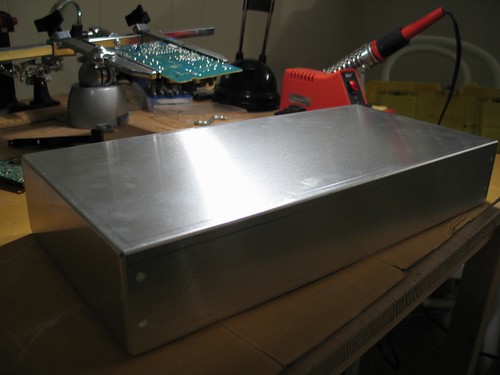
Wow... I guess I chose a bad time to not post for seven months. I've had a few people ask me what the hell the metal box is for in the last post. Sorry it's taken so long to follow that one up!
It's the future case for a theremin. I've always loved theremins, so I've decided to build one. Seven months ago.
It's not quite finished though. I've finished building the main circuit board, and it's really just a matter of mounting it all in the case, and making it look pretty. I have plans to have a nice front panel produced for me, but we'll see.
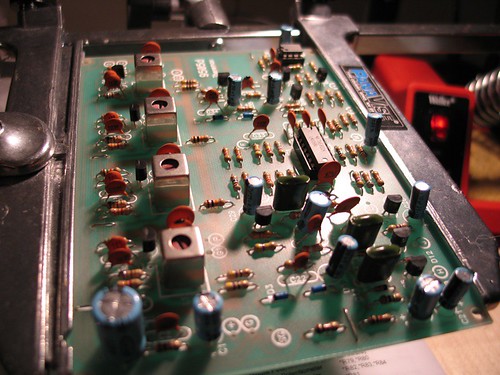
Here's a picture of the assembled circuit board:

It's the future case for a theremin. I've always loved theremins, so I've decided to build one. Seven months ago.
It's not quite finished though. I've finished building the main circuit board, and it's really just a matter of mounting it all in the case, and making it look pretty. I have plans to have a nice front panel produced for me, but we'll see.
Here's a picture of the assembled circuit board:
Sunday, October 21, 2007
Sunday, September 30, 2007
Pimp My Moog, pt. 7
As far as I can tell, this is my final venture into minimoog pimpery. My mini looks so damn hot right now, you have no idea.
I was inspired when I saw this entry on Matrixsynth, one of the synth blogs I visit. The wood just looked so striking. I knew my synth wouldn't be totally pimped if I didn't have something similar done.
Synthwood is a small business owned by a father and son team, both named Stephen. They specialize in wood cases for vintage synthesizers. The case that caught my eye on Matrixsynth was their handiwork. I contacted them and told them what I was looking for. Basically I wanted the same wood as the Voyager, which was a wood called cocobolo.
Since the wood is exotic there was a bit of delay before they got some to work with, and since I'm in Canada it took forever to have the finished case shipped from Texas, where it was built by Stephen Sr.
I finally got it though, and to my dismay the rough handling of the box during shipment had caused the case to come apart! Basically all of the pieces that were glued together came unglued. As anyone who's done even a bit of woodworking can attest, it takes a lot of impact to break apart two well-glued pieces of wood. The case had even been padded in four or five cubic feet of packing pellets and wrapped in foam, so it would have taken quite a beating to do what was done to it. The good old US postal service must have just beat the shit out of that package.
The fortunate thing was that the wood itself was in good shape. I had heard that one or two other cases had been broken to splinters during shipment, so I was actually lucky. And now I had the choice of either sending the pieces back to Texas to be re-assembled, or I could try my hand at doing it myself. Of course I chose to do it myself. I know nothing of woodwork, but I like to learn new things so I gave it a shot. Stephen gave me his blessing and some pieces of advice, including the fact that cocobolo is poisonous. I guess I won't be eating it!
 All of the pieces fit together, so all I really had to do was sand off the old glue and re-glue it together. Normally when you glue wood you're supposed to clamp it together while it sets. Because of the size of the case I wasn't sure how I was going to accomplish this, but I came up with a solution that worked well, as you can see in this photo. I found this strap device at Home Depot and it was perfect.
I wish I could say I glued it together perfectly in one try. It actually took me three tries because I kept finding mistakes I'd made with the alignment of the pieces. It had to be perfect, so I had to break it apart a couple of times and try again. I eventually got it though.
All I had left to do was to put the synth into the new case. This was a process too - I had to do a bit of cutting and drilling. I'll spare you any more details. After it was all done I gave it a new coating of linseed oil to bring the case to its full glory, and I was done:
 If this isn't a pimped-out minimoog I don't know what is. It was even featured on Matrixsynth, which is flattering. If you click on the photo it will bring you to more shots with detail of this gorgeous wood.
There you have it. This entire Pimp My Moog project was made possible by a few key people. I'd like to thank the Joneses of Synthwood (particularly Stephen Sr., who spent a lot of time on the phone with me), Archive Sound for the keyboard bushings, Mr. Kevin Lightner for his expertise and willingness to share, Fantasyjackpalance for the Minimoog resources, Dimension 3 Plastics in Vancouver for the clear wheels, and the folks at Moog Music for the tips (not to mention the stickers and youth-size t-shirt, which fits perfectly).
I'll have more projects to write about here soon, but that's it for a bit. Thanks for reading.
I was inspired when I saw this entry on Matrixsynth, one of the synth blogs I visit. The wood just looked so striking. I knew my synth wouldn't be totally pimped if I didn't have something similar done.
Synthwood is a small business owned by a father and son team, both named Stephen. They specialize in wood cases for vintage synthesizers. The case that caught my eye on Matrixsynth was their handiwork. I contacted them and told them what I was looking for. Basically I wanted the same wood as the Voyager, which was a wood called cocobolo.
Since the wood is exotic there was a bit of delay before they got some to work with, and since I'm in Canada it took forever to have the finished case shipped from Texas, where it was built by Stephen Sr.
I finally got it though, and to my dismay the rough handling of the box during shipment had caused the case to come apart! Basically all of the pieces that were glued together came unglued. As anyone who's done even a bit of woodworking can attest, it takes a lot of impact to break apart two well-glued pieces of wood. The case had even been padded in four or five cubic feet of packing pellets and wrapped in foam, so it would have taken quite a beating to do what was done to it. The good old US postal service must have just beat the shit out of that package.
The fortunate thing was that the wood itself was in good shape. I had heard that one or two other cases had been broken to splinters during shipment, so I was actually lucky. And now I had the choice of either sending the pieces back to Texas to be re-assembled, or I could try my hand at doing it myself. Of course I chose to do it myself. I know nothing of woodwork, but I like to learn new things so I gave it a shot. Stephen gave me his blessing and some pieces of advice, including the fact that cocobolo is poisonous. I guess I won't be eating it!
All of the pieces fit together, so all I really had to do was sand off the old glue and re-glue it together. Normally when you glue wood you're supposed to clamp it together while it sets. Because of the size of the case I wasn't sure how I was going to accomplish this, but I came up with a solution that worked well, as you can see in this photo. I found this strap device at Home Depot and it was perfect.I wish I could say I glued it together perfectly in one try. It actually took me three tries because I kept finding mistakes I'd made with the alignment of the pieces. It had to be perfect, so I had to break it apart a couple of times and try again. I eventually got it though.
All I had left to do was to put the synth into the new case. This was a process too - I had to do a bit of cutting and drilling. I'll spare you any more details. After it was all done I gave it a new coating of linseed oil to bring the case to its full glory, and I was done:
If this isn't a pimped-out minimoog I don't know what is. It was even featured on Matrixsynth, which is flattering. If you click on the photo it will bring you to more shots with detail of this gorgeous wood.There you have it. This entire Pimp My Moog project was made possible by a few key people. I'd like to thank the Joneses of Synthwood (particularly Stephen Sr., who spent a lot of time on the phone with me), Archive Sound for the keyboard bushings, Mr. Kevin Lightner for his expertise and willingness to share, Fantasyjackpalance for the Minimoog resources, Dimension 3 Plastics in Vancouver for the clear wheels, and the folks at Moog Music for the tips (not to mention the stickers and youth-size t-shirt, which fits perfectly).
I'll have more projects to write about here soon, but that's it for a bit. Thanks for reading.
Wednesday, August 1, 2007
Pimp My Moog, pt. 6
This is really a continuation of the last post because I did the work described here at the same time as I replaced the keyboard's bushings. A friend told me that some of my posts were too long to keep his attention so I'm trying not to write novels each time.
 One thing that I noticed a few weeks ago was that certain notes on the Minimoog sounded strange when I played them. They sounded like the were cutting out, as if there was some kind of bad electrical connection. One particularly bad note would sometimes drift in an endless upward portamento, into tonal ranges beyond what you'd normally hear from a Minimoog. It made for a pretty cool effect, but not really what I wanted. Since I was going to have the keyboard out of the synth I thought I'd clean the part that's responsible for triggering notes.
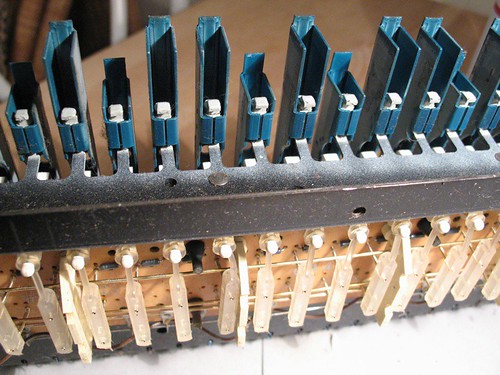
If you look under the keyboard, as shown in these photos, you'll get a glimpse at the mechanism that triggers notes. I can basically explain how it works but here's where it becomes obvious that some areas of my knowledge are lacking. Pressing a key causes a plastic doohicky to pull a rubber thingamabob forward. These are the technical terms. Each rubber thingamabob has two gold contact springs attached to it. When the rubber thingamabob is pulled forward, the gold springs each come into contact with one of two gold buss bars that span the width of the keyboard assembly. One of the buss bars is for the pitch of the note, and one is for triggering the note. I'd like to know more about how this works, in technical terms (if anyone knows, feel free to share), but my speculation is this: the buss bar acts as a variable-strength resistor, which outputs increasing voltages at various contact points from the left to the right. When a spring makes contact with the pitch bar on the left (where the low notes are), a low voltage is outputted, which results in a low pitch. The higher the voltage, the higher the pitch. I'm just speculating. I'd love to know more.
 When I removed the keyboard from the synth it became obvious why certain notes were acting strange: the whole thing was filthy! There was dust buildup from over three decades of use. We're talking about BIG wads of dusty crap. Fortunately it was just dust - there was no evidence that anyone had ever spilled anything on the keyboard or anything like that. Most of the dust was taken care of with a can of duster spray.
If you're doing work on a vintage synth and you're thinking about using a commercial product such as spray-on contact cleaner or control cleaner, please take this word of caution. I was going to do the same thing (after all, the Minimoog service manual recommends a similar product called Cramolin, which I believe is no longer available), but I did a little research first. I came across a couple of threads on the official Moog forums that made me decide against using a spray-on cleaner on the buss bar, and I'll probably never use one anywhere on the synth again. The threads are here (the posts to read are by Kevin Lightner, a synth tech with a LOT of experience):
http://www.moogmusic.com/forum/viewtopic.php?t=3194
http://www.moogmusic.com/forum/viewtopic.php?t=2381
In the end I used Isopropyl Alcohol and some Q-tips. It worked really well, and ALL of my weird note issues have been solved.
The synth is looking and feeling better and better. The last step, as far as I can see, is to get a new wood case. It's currently being produced by an outfit called Synthwood. It's going to be beautiful, as you will soon see.
 One thing that I noticed a few weeks ago was that certain notes on the Minimoog sounded strange when I played them. They sounded like the were cutting out, as if there was some kind of bad electrical connection. One particularly bad note would sometimes drift in an endless upward portamento, into tonal ranges beyond what you'd normally hear from a Minimoog. It made for a pretty cool effect, but not really what I wanted. Since I was going to have the keyboard out of the synth I thought I'd clean the part that's responsible for triggering notes.
If you look under the keyboard, as shown in these photos, you'll get a glimpse at the mechanism that triggers notes. I can basically explain how it works but here's where it becomes obvious that some areas of my knowledge are lacking. Pressing a key causes a plastic doohicky to pull a rubber thingamabob forward. These are the technical terms. Each rubber thingamabob has two gold contact springs attached to it. When the rubber thingamabob is pulled forward, the gold springs each come into contact with one of two gold buss bars that span the width of the keyboard assembly. One of the buss bars is for the pitch of the note, and one is for triggering the note. I'd like to know more about how this works, in technical terms (if anyone knows, feel free to share), but my speculation is this: the buss bar acts as a variable-strength resistor, which outputs increasing voltages at various contact points from the left to the right. When a spring makes contact with the pitch bar on the left (where the low notes are), a low voltage is outputted, which results in a low pitch. The higher the voltage, the higher the pitch. I'm just speculating. I'd love to know more.
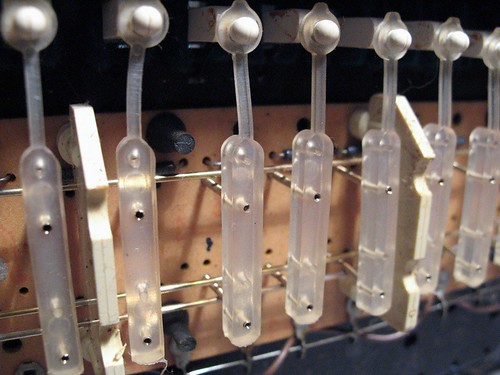 When I removed the keyboard from the synth it became obvious why certain notes were acting strange: the whole thing was filthy! There was dust buildup from over three decades of use. We're talking about BIG wads of dusty crap. Fortunately it was just dust - there was no evidence that anyone had ever spilled anything on the keyboard or anything like that. Most of the dust was taken care of with a can of duster spray.
If you're doing work on a vintage synth and you're thinking about using a commercial product such as spray-on contact cleaner or control cleaner, please take this word of caution. I was going to do the same thing (after all, the Minimoog service manual recommends a similar product called Cramolin, which I believe is no longer available), but I did a little research first. I came across a couple of threads on the official Moog forums that made me decide against using a spray-on cleaner on the buss bar, and I'll probably never use one anywhere on the synth again. The threads are here (the posts to read are by Kevin Lightner, a synth tech with a LOT of experience):
http://www.moogmusic.com/forum/viewtopic.php?t=3194
http://www.moogmusic.com/forum/viewtopic.php?t=2381
In the end I used Isopropyl Alcohol and some Q-tips. It worked really well, and ALL of my weird note issues have been solved.
The synth is looking and feeling better and better. The last step, as far as I can see, is to get a new wood case. It's currently being produced by an outfit called Synthwood. It's going to be beautiful, as you will soon see.
Tuesday, July 24, 2007
Pimp My Moog, pt. 5
A few days ago I received a package in the mail from Archive Sound. Inside the small parcel I found a plastic baggie filled with small slimy rubber bits. Just what I had been waiting for. These were, of course, the new bushings for the Minimoog's keyboard.
Minimoogs, like several other vintage synths, have keyboards made by a company called Pratt-Read. Apparently P-R stopped making synth keyboards many years ago, and now they make screwdrivers. I can't really find any info about P-R keyboards, their history in the keyboard-making business, or what made them give it all up for screwdrivers. Perhaps we'll never know. I'm waiting for the shocking tell-all novel, or at least a Wikipedia entry.
The bushings are the small rubber bits that fit snugly inside the individual keys, and as far as I can tell, their purpose is to give the keyboard a nice soft (almost squishy) action. Since these keyboards are so old now (mine's 34 years old), the rubber bushings become hard, and they sometimes even disintegrate. With old bushings, keys become uneven, and they have a harder action. Sometimes they click.
Installing the new bushings is a pretty simple job. If you get your replacement bushings from Archive Sound, they have instructions on their web site. I'll try not to be redundant here.
 Removing the keyboard from the Minimoog is fairly simple. On the bottom of the synth are a bunch of wood screws keeping the bottom panel in place. The bottom of my synth has a little something extra, as you can see in the picture (Backbone lives!).
Once you remove the bottom panel you can see the keyboard assembly much clearer, and the screws holding it in place. The keyboard is connected via a cinch connector, which needs to be disconnected. MAKE SURE you mark the connector so that you can put it back together the right way. The keyboard is screwed into the case through some wooden shims that keep it at the right height. There are four of these shims (although I understand that some later versions don't have them). If the shims aren't glued in place, make sure you know which one goes where, as they are different heights. After the keyboard is unplugged and unscrewed it should just come out.
 Since the bushing replacement required the removal of the plastic key covers I took that opportunity to clean them. The whole keyboard assembly was really gross, actually, so I gave it a thorough dusting and I washed the keys in soapy water. Super-duster spray and Q-tips took care of the rest.
 The bushings are the white bits with pointy ears visible inside the keys in the above picture. They are kind of awkwardly placed, so you need a tool well-suited to remove them. I found that a flat-head precision screwdriver (the kind used in computer repair) worked perfectly. You just need to jam the screwdriver under the bushing, work it a little bit, and pull it off. Some bushings don't come out in one piece, so the screwdriver also comes in handy for scraping remnants off of the key.
Once the old bushings are off, just pop the new ones on and you're set. Make sure you get the bushing right-side up. The bottom and the top look similar but they're not the same.
The keys on the synth feel a lot nicer now. The Pratt-Read bushing kit is a good buy if you want to bring some life back in to your old synth keyboard.
Minimoogs, like several other vintage synths, have keyboards made by a company called Pratt-Read. Apparently P-R stopped making synth keyboards many years ago, and now they make screwdrivers. I can't really find any info about P-R keyboards, their history in the keyboard-making business, or what made them give it all up for screwdrivers. Perhaps we'll never know. I'm waiting for the shocking tell-all novel, or at least a Wikipedia entry.
The bushings are the small rubber bits that fit snugly inside the individual keys, and as far as I can tell, their purpose is to give the keyboard a nice soft (almost squishy) action. Since these keyboards are so old now (mine's 34 years old), the rubber bushings become hard, and they sometimes even disintegrate. With old bushings, keys become uneven, and they have a harder action. Sometimes they click.
Installing the new bushings is a pretty simple job. If you get your replacement bushings from Archive Sound, they have instructions on their web site. I'll try not to be redundant here.
Removing the keyboard from the Minimoog is fairly simple. On the bottom of the synth are a bunch of wood screws keeping the bottom panel in place. The bottom of my synth has a little something extra, as you can see in the picture (Backbone lives!).Once you remove the bottom panel you can see the keyboard assembly much clearer, and the screws holding it in place. The keyboard is connected via a cinch connector, which needs to be disconnected. MAKE SURE you mark the connector so that you can put it back together the right way. The keyboard is screwed into the case through some wooden shims that keep it at the right height. There are four of these shims (although I understand that some later versions don't have them). If the shims aren't glued in place, make sure you know which one goes where, as they are different heights. After the keyboard is unplugged and unscrewed it should just come out.
Since the bushing replacement required the removal of the plastic key covers I took that opportunity to clean them. The whole keyboard assembly was really gross, actually, so I gave it a thorough dusting and I washed the keys in soapy water. Super-duster spray and Q-tips took care of the rest.The bushings are the white bits with pointy ears visible inside the keys in the above picture. They are kind of awkwardly placed, so you need a tool well-suited to remove them. I found that a flat-head precision screwdriver (the kind used in computer repair) worked perfectly. You just need to jam the screwdriver under the bushing, work it a little bit, and pull it off. Some bushings don't come out in one piece, so the screwdriver also comes in handy for scraping remnants off of the key.Once the old bushings are off, just pop the new ones on and you're set. Make sure you get the bushing right-side up. The bottom and the top look similar but they're not the same.
The keys on the synth feel a lot nicer now. The Pratt-Read bushing kit is a good buy if you want to bring some life back in to your old synth keyboard.
Thursday, July 19, 2007
Pimp My Moog, pt. 4
I'm very excited about this one. This is a mod that I had secretly been thinking about for quite a while, but I made no mention of it for fear that it wouldn't end up happening and I'd have to eat my words. Fortunately none of that happened, and I ended up being able to do the mod. Namely, I have added illuminated pitch and mod wheels to the synth.
This is something that I've seen before on the newer Minimoog "Voyager" synths, which are currently being made by Moog Music. It did cross my mind that this mod might detract a bit from the "classic" appeal of the synth, but I also knew that the very last run of the original Minimoogs had illuminated wheels, so it wasn't altogether sacrilegious. And anyway, screw all that - it looks freaking awesome.
The mod itself was quite simple, but it depended on a couple of key things happening. First, I had to find clear plastic wheels for the minimoog (my original ones were opaque white plastic), and secondly I had to figure out a way to draw power to the LEDs without messing up the synth. Synthesizers like this one depend on precise voltages to make it work, and I didn't want to mess with that without some advice from people who have done it before.
The first thing I did was to call Moog headquarters in North Carolina. I just like hearing their accents. Their tech department is quite helpful even when talking about a synth they haven't produced in 25 years. The guy I talked to explained it pretty simply: "Basically you need a clear wheel, and you point an LED at it." He pretty much blew my mind.
Next, I looked up "plastics manufacturing" in Google and found one in the Vancouver area. I dropped in to talk to a fabricator, and brought one of the original white wheels with me. I asked if he could make two of these for me in clear plastic, and he said no problem. They cost me about $20 a piece, which was more or less what I expected. In two days they were done and they looked amazing. I installed them in the Moog's left-hand control as soon as I got home.
 The wheels are a fairly simple mechanism. Basically they have a quarter-inch hole in their center, which fits snugly on the end of a potentiometer. Inside the wheel is a little black hex screw to secure it to the pot. If you're doing this mod and you're talking to a plastics manufacturer, make sure the hole for the screw is done properly, including the threading for the screw itself.
The pitch wheel has an extra mechanism to make it lock in to its center position (called a "detent") - essentially there's a small pointy plastic cone that pushes against the wheel and when the wheel is in its center position the cone locks in to a small dimple in the wheel itself. Again, if you're dealing with plastics people, the dimple in the wheel is pretty important, and could be easily missed.
Once the wheels were in place I had to figure out how the heck to get LEDs running underneath them. I tried posing this question to a Minimoog forum but I made the mistake of mentioning that I was "fairly new to the world of electronics" (I said this in hopes of getting some gems of knowledge from them), instead all I got back was people telling me that "pulling apart a vintage synthesizer" was not the place for one to make their debut in electronics. The only thing I learned from them was that people won't help me if I say I'm fairly new. I think they assumed I meant I was a beginner, which isn't the case. My skill is more at the "intermediate" level. Besides, they were overstating the difficulty of the project: there's very little pulling apart of anything involved in the job, unless you count loosening screws (hardly an advanced task).
I then sent an e-mail to a professional synth tech. I knew he's probably done this mod a million times before, so I was hoping he'd give me some tips. Luckily for me, he responded very quickly, and even sent me some photos of projects he's done to give me some ideas. He gave suggestions on choosing LEDs, placement of LEDs, how to mount them, and where to draw power for them. With his advice, in combination with the detailed documentation available at FantasyJackPalance.com I had all the information I needed to begin the work.
 Powering LEDs is a pretty simple task, but I still didn't want to risk messing up the synth, so I did all my planning on a breadboard. The Minimoog has +10v available inside the left-hand control area, so I mimicked that by generating 10 volts with a small project power supply that I built a while back. It lit up like glory, as you can see in this picture.
The next step was to figure out a method of mounting the LEDs inside the Minimoog. Unfortunately I wasn't able to find the same type of terminal strip that was suggested to me, but it did give me ideas on how to improvise. I got a hold of a small pliable metal bracket, which seemed perfect for the job. I mounted the bracket on the outer screw for the decay switch, right above the wheels. Small standoffs would have been perfect for the job, but I couldn't find any, so I swapped the screw for an extra long one (3/4"), and fastened the bracket with some nuts. You can see what I'm talking about in the picture to the left. I had to do a little drilling on the bracket to get it to fit over the screws but that was simple enough.
Next, I took my little LED circuit and made it permanent on a small solder strip. The plan was to attach the whole thing to the top of the bracket, so I drilled a hole for a screw in the strip. If you're going to do something like this, make sure you design it so the screw and the bracket are safely distanced from the components of your circuit. You don't want to inadvertently short it.
 Once the LED circuit was assembled I mounted it on to the bracket. I had it positioned so that it spanned the two wheels, with an LED on each end. I kept the LED leads nice and long so I'd be able to place them so they almost touched the wheels.
By the way, clicking on any of these photos will take you to a larger version, or you can see a whole set of them on Flickr.
Power for the LED circuit was drawn from the +10v terminal on the cinch connector at the top of the left-hand control area. If you're looking at the connector like this, the +10v is one pin below the top-left. Make sure you consult documentation and test the pin with a multimeter before you use it. Ground is just to the right of the +10v pin, and it's distributed all over the left-hand control area. I connected to the +10v right at the connector, and I grounded the circuit using the ground connection on the pitch bend potentiometer.
And that, my friends, is all it took. It was a lot of finnicky work but relatively simple. It really paid off in the end:

This is something that I've seen before on the newer Minimoog "Voyager" synths, which are currently being made by Moog Music. It did cross my mind that this mod might detract a bit from the "classic" appeal of the synth, but I also knew that the very last run of the original Minimoogs had illuminated wheels, so it wasn't altogether sacrilegious. And anyway, screw all that - it looks freaking awesome.
The mod itself was quite simple, but it depended on a couple of key things happening. First, I had to find clear plastic wheels for the minimoog (my original ones were opaque white plastic), and secondly I had to figure out a way to draw power to the LEDs without messing up the synth. Synthesizers like this one depend on precise voltages to make it work, and I didn't want to mess with that without some advice from people who have done it before.
The first thing I did was to call Moog headquarters in North Carolina. I just like hearing their accents. Their tech department is quite helpful even when talking about a synth they haven't produced in 25 years. The guy I talked to explained it pretty simply: "Basically you need a clear wheel, and you point an LED at it." He pretty much blew my mind.
Next, I looked up "plastics manufacturing" in Google and found one in the Vancouver area. I dropped in to talk to a fabricator, and brought one of the original white wheels with me. I asked if he could make two of these for me in clear plastic, and he said no problem. They cost me about $20 a piece, which was more or less what I expected. In two days they were done and they looked amazing. I installed them in the Moog's left-hand control as soon as I got home.
The wheels are a fairly simple mechanism. Basically they have a quarter-inch hole in their center, which fits snugly on the end of a potentiometer. Inside the wheel is a little black hex screw to secure it to the pot. If you're doing this mod and you're talking to a plastics manufacturer, make sure the hole for the screw is done properly, including the threading for the screw itself.The pitch wheel has an extra mechanism to make it lock in to its center position (called a "detent") - essentially there's a small pointy plastic cone that pushes against the wheel and when the wheel is in its center position the cone locks in to a small dimple in the wheel itself. Again, if you're dealing with plastics people, the dimple in the wheel is pretty important, and could be easily missed.
Once the wheels were in place I had to figure out how the heck to get LEDs running underneath them. I tried posing this question to a Minimoog forum but I made the mistake of mentioning that I was "fairly new to the world of electronics" (I said this in hopes of getting some gems of knowledge from them), instead all I got back was people telling me that "pulling apart a vintage synthesizer" was not the place for one to make their debut in electronics. The only thing I learned from them was that people won't help me if I say I'm fairly new. I think they assumed I meant I was a beginner, which isn't the case. My skill is more at the "intermediate" level. Besides, they were overstating the difficulty of the project: there's very little pulling apart of anything involved in the job, unless you count loosening screws (hardly an advanced task).
I then sent an e-mail to a professional synth tech. I knew he's probably done this mod a million times before, so I was hoping he'd give me some tips. Luckily for me, he responded very quickly, and even sent me some photos of projects he's done to give me some ideas. He gave suggestions on choosing LEDs, placement of LEDs, how to mount them, and where to draw power for them. With his advice, in combination with the detailed documentation available at FantasyJackPalance.com I had all the information I needed to begin the work.
Powering LEDs is a pretty simple task, but I still didn't want to risk messing up the synth, so I did all my planning on a breadboard. The Minimoog has +10v available inside the left-hand control area, so I mimicked that by generating 10 volts with a small project power supply that I built a while back. It lit up like glory, as you can see in this picture.The next step was to figure out a method of mounting the LEDs inside the Minimoog. Unfortunately I wasn't able to find the same type of terminal strip that was suggested to me, but it did give me ideas on how to improvise. I got a hold of a small pliable metal bracket, which seemed perfect for the job. I mounted the bracket on the outer screw for the decay switch, right above the wheels.
Small standoffs would have been perfect for the job, but I couldn't find any, so I swapped the screw for an extra long one (3/4"), and fastened the bracket with some nuts. You can see what I'm talking about in the picture to the left. I had to do a little drilling on the bracket to get it to fit over the screws but that was simple enough.Next, I took my little LED circuit and made it permanent on a small solder strip. The plan was to attach the whole thing to the top of the bracket, so I drilled a hole for a screw in the strip. If you're going to do something like this, make sure you design it so the screw and the bracket are safely distanced from the components of your circuit. You don't want to inadvertently short it.
Once the LED circuit was assembled I mounted it on to the bracket. I had it positioned so that it spanned the two wheels, with an LED on each end. I kept the LED leads nice and long so I'd be able to place them so they almost touched the wheels.By the way, clicking on any of these photos will take you to a larger version, or you can see a whole set of them on Flickr.
Power for the LED circuit was drawn from the +10v terminal on the cinch connector at the top of the left-hand control area. If you're looking at the connector like this, the +10v is one pin below the top-left. Make sure you consult documentation and test the pin with a multimeter before you use it. Ground is just to the right of the +10v pin, and it's distributed all over the left-hand control area. I connected to the +10v right at the connector, and I grounded the circuit using the ground connection on the pitch bend potentiometer.
And that, my friends, is all it took. It was a lot of finnicky work but relatively simple. It really paid off in the end:
Subscribe to:
Posts (Atom)